
Welcome to a bubbly adventure in the vast universe of Minecraft!
Here we learn how to make bubbly water in Minecraft. Whether you’re a seasoned builder or a curious newcomer, mastering the art of creating hot bubbly water, or the more sophisticated bubble elevators, will add an exciting layer to your Minecraft experience.
This tutorial is designed to guide Minecraft players through the process, making use of various elements like magma blocks, soul sand, and more, across different versions of Minecraft, including the Bedrock Edition, Pocket Edition, and even on your Nintendo Switch. So, grab your crafting table and let’s dive in!

The Essence of Bubbly Water in Minecraft
Before we get our feet wet, let’s talk about why you’d want to create bubbly water in Minecraft. Aside from the sheer joy of watching bubble columns whisk you away to the top of the water or down to the ocean bed, these features are practical. They serve as rapid transportation methods (water elevators), innovative mob traps, or even just as aesthetic additions to your underwater or spa-themed builds. Imagine your own Minecraft version of a seltzer water hot tub with hot bubbly water—a perfect relaxation spot after a long day of mining and crafting.

Gathering Your Materials
To start, you’ll need the following items:
- Bucket of Water: Essential for creating your water source blocks.
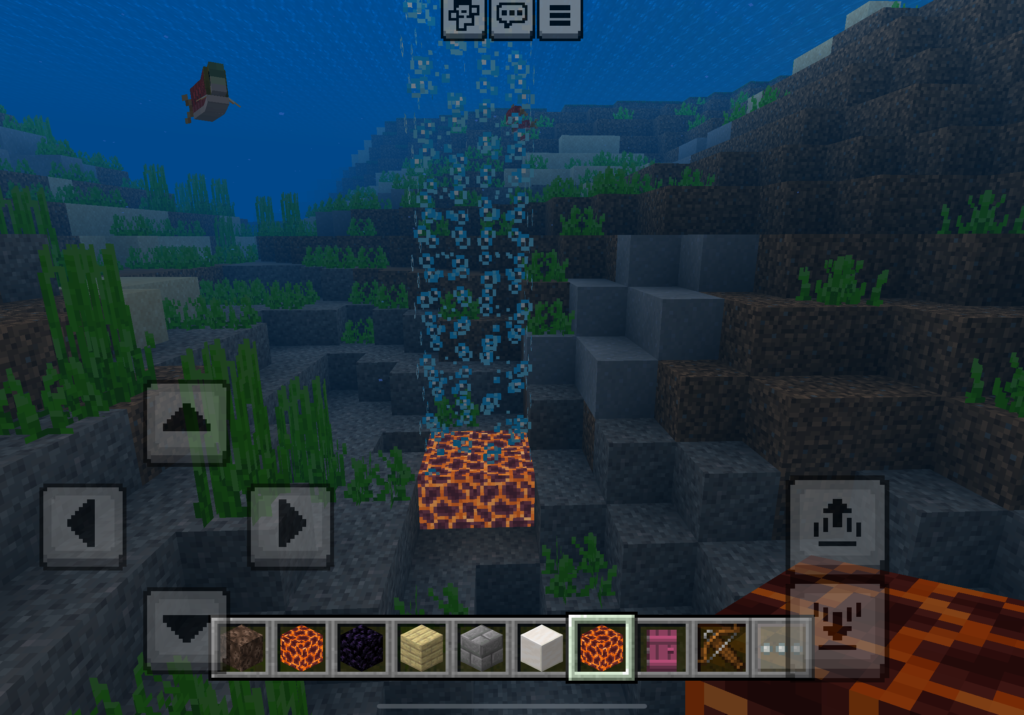
- Magma Blocks or a Block of Soul Sand: Magma blocks create the bubble effect that pulls you down, while soul sand pushes you up.
- A block of your choice: To encase your bubble elevator or hot tub design.
- Coral Block: Adds a vibrant touch to your underwater creations.
- Wooden Planks: Because you always need wooden planks.

The Crafting Table: Your Best Friend
Your crafting table is not just a useful item; it’s your gateway to unlocking the potential of your inventory. While it might not be directly involved in crafting water source blocks or bubble columns, it’s essential for crafting buckets, doors, and other components of your build. Keep it handy!
Step-by-Step Instructions:
Creating a Water Elevator:
- Choose Your Location: Whether it’s in a warm ocean biome near a coral reef or in your survival mode base, find the perfect spot.
- Build the Structure: Use glass blocks to create a tube, ensuring it goes from the ocean floor or ground level to your desired height. Make sure the top is open to prevent fall damage.
- Place Your Water Source Blocks: Using buckets of water, fill every block inside the tube from bottom to top. This is crucial for the bubble effect to work correctly.
- Activate the Bubbles: Place a magma block at the bottom for a downward elevator (hot bubbly water effect), or a block of soul sand for an upward bubble stream.
- Entry and Exit Points: Add doors or trap doors at the bottom and top to enter and exit your elevator smoothly.

For Hot Tub Designs:
- Layout Your Foundation: Using solid blocks of your choice, outline your hot tub. Incorporate wooden planks and quartz stairs for seating and aesthetic appeal.
- Add Water and Bubbles: Fill the tub with water source blocks. Place soul sand blocks in the centre for that cozy hot bubbly water feel. Surrounding coral blocks add a touch of the sea.
- Finishing Touches: Use glass blocks for a sleek look, and trap doors or an upside-down quartz staircase for stylish entry points. Add a smoke cloud effect in your hot tub using campfires safely hidden underneath slabs, to give an extra steamy look.
Additional Tips for Minecraft Players
- Understanding Block States: Knowing how block states change when interacting with water can help you create more complex designs.
- Preventing Fall Damage: Using bubble columns can help prevent fall damage when falling from great heights—just make sure you’re landing in water!
- Crafting in Different Versions: Whether you’re on the Nintendo Switch, playing in the Pocket Edition, or exploring the Bedrock Edition, the principles remain the same, though game control might vary slightly.

Creating bubbly water in Minecraft, be it for a practical water elevator or a luxurious hot tub, is not just about following steps; it’s about letting your creativity flow like fresh water. With the right materials magma blocks for that delightful bubble effect, coral blocks for color, and glass blocks for structure—you can transform your Minecraft world. Remember, every block placed, from the water surface to the cozy bottom of your tub, tells a story. So, what will yours be? Embrace the version history, experiment with new bubble columns, and most importantly, have fun creating something uniquely yours in the Minecraft universe. Happy crafting!
Related Posts
Can you Melt Blue Ice in Minecraft?
A Guide on How to Make a Clock in Minecraft
How Long Does it Take For SugarCane To Grow In Minecraft?

